Technical Game Designer
Gameplay Systems · Game AI · Tools
Kenechukwu Umelo

Backstory:
I took a Gameplay Engineer Test in early 2024 for a game company. One question required me to build a "Boids" system (developed by Craig Reynolds in 1986) in Unreal Engine 5. At the time, I didn't get as far as I wanted.
After completing this cool Unreal C++ Course, I revisited the challenge to showcase what I had learned from the 40+ hour course.
As someone who enjoys emergent gameplay and behaviors in Game AI, I found this project a personal showcase of my growth since my first attempt.

A School of Fish
A Swarm of Bugs
Implementing Flocking Rules
With resources available detailing the flocking algorithm. This source included tons of pseudocode and methods for implementing a "boid," which helped me get started. Since I was working in a 3D space, I began by having the boid move forward within set boundaries.
Boids always travel forward, but I set up the Boid Manager to randomize their facing direction each time.
Once that was established, I implemented the three core flocking rules into each boid individually in C++. Here are all the examples for separation, alignment, and cohesion below:
1. Alignment (Boids steers in the same direction of their neighbor)
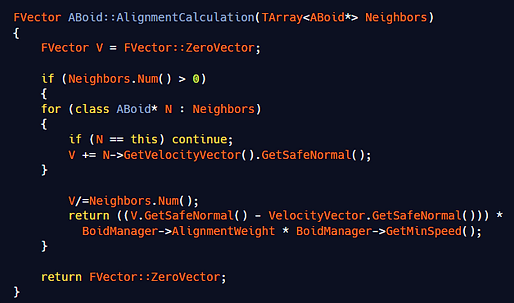
2. Seperation (Boids trying to steer away from one another)

3. Cohesion (Boids steering towards the center of their nearby neighbors)
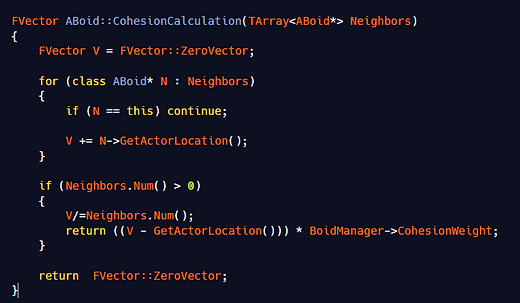
Funny enough, after implementing these rules, I found that combining the Cohesion and Separation values gives the best results for "schooling" boids.
Obstacle Avoidance
With the rules of flocking implemented, the next challenging step was to avoid obstacles. Obstacle avoidance consists of a large number of raycasts pointing in several different directions. When the boid is near an obstacle or collides with it, the raycast generates steering directions toward or away from the obstacle. Very similar to how Unity handles avoidance with their Nav Mesh Agents.
With research done, I stumbled across this stackflow that helped me set up a sphere of points evenly around the points in order for all the tracing directions to be handled. I was able to translate most of the math here thanks to this source, despite not understanding it all that much.

I implemented avoidance steering using a simple line trace and a dot product to constrain the view angle. I knew that using the actor's forward direction and its position would be the simplest way to set a good angle for the avoidance steer vector directions.

As a result, I was able to get the avoidance working. I added extra speed here to improve steering, since it slowed the overall velocity vector.
Boid Manager
The Boid Manager manages several values and variables that must be populated before a simulation starts. As a result, I designed several simulations using the Boid Manager as a Blueprint, each with different population and rule values.
Reflection

What What I Improve
-
Add Debugging Tools
-
The lack of debugging made it difficult to test whether the flocking rules were working, whether boids would exit bounds, or whether their speed would remain clamped. I was able to implement line-trace debugging late in development, but I aim to do it early for any systems I work on.
-
-
Polished Boid Manager
-
The boid manager was built primarily in C++. I had difficulty using child blueprints to create separate scenes, primarily due to the UI, which made it hard to configure the flocking-rule sliders without causing crashes at times. Looking back at the script, I realized the lack of fail-safes (return calls) I don't include for out of range limitation on the scripts.
-
Resources
-
Videos
-
Github/Portfolios